> For the complete documentation index, see [llms.txt](https://wiki.secrets.ai/llms.txt). Markdown versions of documentation pages are available by appending `.md` to page URLs; this page is available as [Markdown](https://wiki.secrets.ai/extra/moments-and-payments.md).
# Moments & Payments
Moments are the tokens and currency that power premium features in Secrets AI. Learn how to purchase, manage, and use moments effectively.
### What are Moments?
Moments are the tokens of Secrets AI. They are credits used for premium features like image generation, video creation, and audio calls. Think of them as the currency that unlocks advanced features beyond basic chatting.
#### How Moments Work
* **Currency**: Moments are your account currency
* **Tokens**: "Tokens" and "moments" mean the same thing in Secrets AI
* **Subscription Grants**: Paid subscriptions include monthly grants that reset each month
* **Balance**: Your balance is shown in the top navigation
#### Moment Balance
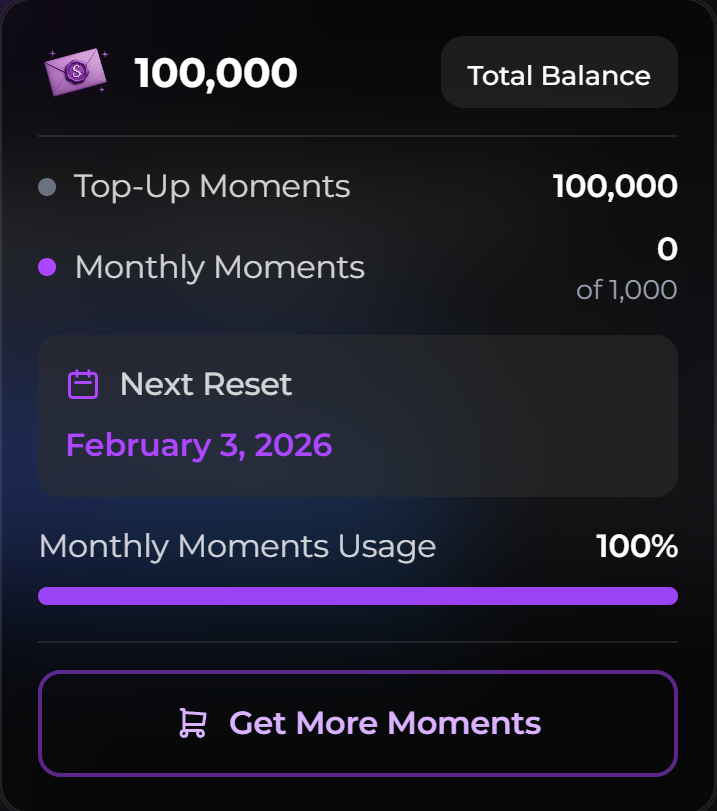
Your moment balance includes:
* **Purchased Moments**: Moments you've bought (Top-Up Moments)
* **Subscription Grants**: Monthly moments included with your subscription (reset monthly)
* **Total Balance**: Combined total available to use (can drop when grants reset)
### How to Purchase Moments
{% hint style="warning" %}
**A paid subscription (PREMIUM or ULTIMATE) is required to purchase moments.** Moments cannot be bought on the FREE tier. If you're on FREE, subscribe first, then you can top up moments anytime from the Store.
{% endhint %}
#### Purchasing Process
**Step 1: Navigate to Store**
* Click "Store" in top navigation
* Open the moments purchase section
* View available moment amounts
**Step 2: Select Amount**
* Choose the moment amount you want
* See price and moment amount
* Check subscription bonuses (if applicable)
**Step 3: Complete Purchase**
* Click "Purchase" on your chosen option
* Enter payment information
* Confirm purchase
* Moments added to account immediately
#### Payment Methods
**Credit/Debit Cards**
* Visa, Mastercard, Discover
* Secure payment processing
* Instant moment delivery
* **Discreet billing**: Charges show as `S LABS INC` on your card statement.
**Cryptocurrency**
* 300+ cryptocurrencies accepted
* Minimum $20 for crypto payments
* Processing time may vary depending on chain
**Alternate: G2A subscription keys (last resort)**
If neither cards nor crypto work for you, prepaid **Premium and Ultimate subscription keys** are available on G2A in 3-month and 12-month terms, redeemable at [secrets.ai/redeem](https://www.secrets.ai/redeem).
{% hint style="warning" %}
This is an **alternate payment method of last resort** — use the Store whenever possible. G2A keys do **not** auto-renew, can only be redeemed when you have **no active subscription**, and **cannot** be used to extend or upgrade an existing subscription. They also only cover subscriptions — Moments top-ups and bundles still require a card or crypto. See [Alternate Payment: G2A Keys](/extra/g2a-subscription-keys.md).
{% endhint %}
### Sale prices and renewals
During a subscription sale, an eligible plan may show a discount for its **first billing period**. Check both the initial charge and the renewal price before paying. The discounted first charge is not the ongoing subscription price unless the offer explicitly says so.
Use the Store or **User Settings → Subscription** to check the plan and billing details shown for your account. Regular plan prices are listed in [Subscription Tiers & Limits](/get-started/subscription-tiers-and-limits.md). Seasonal artwork and sale countdowns do not change your plan's included features.
### Subscription grants and bonuses
#### Monthly Grants
Paid subscriptions include monthly moment grants:
| Tier | Monthly Grant |
| ------------ | -------------- |
| **PREMIUM** | 8,000 moments |
| **ULTIMATE** | 15,000 moments |
#### Grant Timing
* **Granted monthly**: On your subscription renewal date
* **Automatic**: Applied automatically. No action needed.
* **Resets monthly**: Your grant balance is set back to your tier’s monthly amount.
* **No rollover**: Unused grant moments don’t carry into the next month.
* **Purchased moments stay**: Top-Up moments are not reset.
* **Upgrade exception**: If you upgrade your subscription mid-cycle from a **Monthly** plan, any unused grant Moments at that moment are **converted to Top-Up Moments** (non-expiring) instead of being lost. See [Upgrading Mid-Cycle](/get-started/subscription-tiers-and-limits.md#upgrading-mid-cycle).
{% hint style="info" %}
Because grants reset, your **total** moments can go down at renewal if you had unused grant moments. (This does not apply to mid-cycle upgrades from Monthly plans — see the upgrade exception above.)
{% endhint %}
#### Purchase bonuses
Purchasing moments requires a paid subscription, and your tier determines your bonus:
* **PREMIUM**: 10% bonus on moment purchases
* **ULTIMATE**: 15% bonus on moment purchases
### Bundles
Character bundles are curated packs of exclusive photos and videos for a specific companion. They unlock extra visual content beyond what appears on that companion's profile.
#### How bundles work
* Available bundles appear under the **Bundles** tab on a companion's profile.
* Bundles are purchased with **moments** from your existing balance.
* A **paid subscription** is required to purchase bundles.
* Once purchased, access is **permanent**.
* You can view owned bundle content anytime from the companion's profile or your collection.
#### Where to find bundles
Open a companion's profile and select the **Bundles** tab. You'll see available packs, their moment cost, and whether you already own them.
### Feature Costs Reference
#### Image Generation Costs
| Feature | Cost |
| ------------------------------------ | ----------- |
| **Image Generation** (Premium) | 50 moments |
| **Advanced Image** (1K Fast or 1.5K) | 50 moments |
| **Advanced Image** (2K) | 100 moments |
| **Extra reference photo** (Advanced) | 10 moments |
| **Image Edit (SFW)** | 50 moments |
1K (Fast) and 1.5K cost the same; 1K renders fastest and 2K doubles the price. The first reference photo in an Advanced generation is included in the base price; each additional reference adds 10 moments. 4K images are coming soon.
In a one-to-one [chat photo](/create/chat-photos.md), including an Ultimate persona adds **10 Moments**: 60 total at 1K/1.5K or 110 at 2K. [Solo persona photos](/create/persona-photos.md#moments-and-costs) support batches of 1–8; extra gallery references add 10 Moments per reference, per photo. Persona photo editing costs 50 Moments.
{% hint style="info" %}
A request stopped by a safety check before generation is never charged, and a generation that fails after it starts is refunded automatically. See [Safety Check Messages](/create/image-generation.md#safety-check-messages).
{% endhint %}
#### Video Generation Costs
| Model | 720p, 5 seconds | Pricing |
| -------------------- | --------------- | ------------------------------------------------- |
| **Everyday** | 640 moments | Varies by resolution and duration |
| **Cinematic** | 1,200 moments | Varies by resolution and duration |
| **Cinematic Fast** | 1,200 moments | Varies by resolution and duration |
| **Classic** | 600 moments | Varies by resolution, duration and audio |
| **Intimate** | 850 moments | Varies by resolution and duration |
| **Intimate + Turbo** | 1,180 moments | Varies by resolution and duration |
| **Basic** | 320 moments | Varies by resolution and duration; audio included |
Each model shows its price for your current settings, and the exact cost is shown on the Generate button before you generate. Reference photos and clips add no extra cost. See [Which Model Should I Use?](/create/video-generation.md#which-model-should-i-use)
#### Secret Shorts Episode Unlocks
Paid episode unlocks require **Premium or Ultimate** and spend the price shown for the selected episode. Unlocking one episode does not unlock the entire series or future episodes. Replaying an episode you already unlocked on the same account does not charge again.
Free opening episodes and account-required episodes do not require a paid plan. If you have an eligible free unlock credit, the player offers **Unlock free**, including on a Free plan. See [Secret Shorts](/get-started/secret-shorts.md#free-episodes-sign-in-and-unlocks) for the full guide.
#### Audio Call Costs
| Feature | Cost |
| -------------- | ----------------- |
| **Audio Call** | 50 moments/minute |
#### Custom Character Costs
| Feature | Cost |
| ---------------------- | ---------------------------- |
| **Character Creation** | 500 moments (first one free) |
### Payment Troubleshooting
{% hint style="info" %}
There are no cooldown timers or daily purchase limits on moment purchases. If a purchase fails, it is a payment issue — not a platform restriction. Users should retry or try a different payment method.
{% endhint %}
**Payment Declined**
**Possible Causes**:
* Insufficient funds
* Card issues
* Payment processor issues
* Security blocks
**Solutions**:
* Check card balance
* Verify card details
* Try different payment method
* Contact card issuer
* Contact support if persists
#### Crypto Payment Failed
If your crypto payment fails, do **not** keep retrying the same checkout.
Use one of these paths instead:
* Open a **support ticket in Discord**
* Contact **NOWPayments** directly
{% hint style="warning" %}
For crypto payment failures, support is handled through Discord tickets or NOWPayments. This is the fastest way to resolve missing, stuck, failed, or delayed crypto payments.
{% endhint %}
### Frequently Asked Questions
**Q: What are moments used for?**
* Moments power premium features: image generation, video creation, audio calls, custom characters, bundles.
**Q: How do I buy moments?**
* First, you need an active paid subscription (PREMIUM or ULTIMATE) — moments cannot be purchased on the FREE tier.
* Then go to Store, select a moment amount, and complete payment. Moments are added immediately.
**Q: Can I buy moments without a subscription?**
* No. A paid subscription (PREMIUM or ULTIMATE) is required to purchase moments. Subscribe first, then you can top up moments anytime.
**Q: Do moments expire?**
* **Purchased moments** don’t expire.
* **Subscription grant moments** reset each month on your renewal date.
**Q: Do monthly subscription grants roll over?**
* No. Any unused grant moments are replaced by the new month’s grant amount.
* **Exception**: If you **upgrade mid-cycle from a Monthly plan**, your unused grant Moments are converted to non-expiring **Top-Up Moments** rather than being lost.
**Q: What happens to my unused Moments if I upgrade mid-cycle?**
* **From a Monthly plan**: Unused grant Moments are converted to **Top-Up Moments** (non-expiring) and stay in your balance. You then receive your new plan's Moment grant on top.
* **From a Multi-Month plan** (Quarterly, Biannual, Annual): The **dollar value** of months you haven't started yet (months you haven't received a grant for) is credited toward the upgrade at checkout. Already-granted Moments stay in your balance as normal.
* See [Upgrading Mid-Cycle](/get-started/subscription-tiers-and-limits.md#upgrading-mid-cycle) for the full breakdown and a worked example.
**Q: What payment methods are accepted?**
* Credit/debit cards and cryptocurrency (minimum $20 for crypto).
* As a **last resort only**, prepaid 3-month and 12-month Premium/Ultimate subscription keys are available on G2A. They don't auto-renew and can only be redeemed with no active subscription — see [Alternate Payment: G2A Keys](/extra/g2a-subscription-keys.md).
**Q: Can I buy Moments with a G2A key?**
* No. G2A keys cover subscriptions only. Moments top-ups and bundles still require a card or crypto payment.
**Q: What should I do if my crypto payment fails?**
* Open a support ticket in Discord or contact NOWPayments directly.
* Do not keep retrying the same failed crypto checkout.
**Q: Is billing discreet? What will show on my statement?**
* Yes. Charges show as `S LABS INC` on your card statement.
**Q: Do subscriptions include moments?**
* Yes! PREMIUM: 8,000/month, ULTIMATE: 15,000/month.
**Q: Do I get bonuses on purchases?**
* PREMIUM gets a 10% bonus on moment purchases.
* ULTIMATE gets a 15% bonus on moment purchases.
**Q: How much do features cost?**
* Images: 50 moments, Videos: varies by settings, Audio calls: 50 moments/minute, Custom characters: 500 moments.
**Q: Where do I see my balance?**
* Top navigation bar shows your moment balance. Click for details.
**Q: Can I transfer moments to another account?**
* No, moments are non-transferable and tied to your account.
***
Need help? Check out [Tips & Tricks](/extra/tips-and-tricks.md) or contact !