> For the complete documentation index, see [llms.txt](https://wiki.secrets.ai/llms.txt). Markdown versions of documentation pages are available by appending `.md` to page URLs; this page is available as [Markdown](https://wiki.secrets.ai/get-started/chat-modes-and-thinking-levels.md).

# Chat Modes & Thinking Levels

Choose between S3, S4, S5, and X-3, adjust thinking levels, and set preferences for one chat or future conversations.

**Chat mode** chooses how your companion generates replies. **Thinking level** controls how much thinking it does before answering in S3, S4, or S5. Higher thinking levels take longer to respond.

These settings work alongside **SMS / Paragraph**, which controls reply format, and **Spice Level**, which controls the conversation's tone. See [Chat Features](/get-started/chat-features.md) for those controls.

## Current chat modes

| Mode    | What to expect                                                      | Available on            | Thinking levels                 |
| ------- | ------------------------------------------------------------------- | ----------------------- | ------------------------------- |
| **S3**  | The standard option for everyday conversations and roleplay.        | Free, Premium, Ultimate | Off, Low, High; Max on Ultimate |
| **S4**  | A faster alternative to S3 with a similar approach to conversation. | Ultimate                | Off, Low, High, Max             |
| **S5**  | A fast, capable option to try for conversations and roleplay.       | Premium, Ultimate       | Off, Low, High; Max on Ultimate |
| **X-3** | An experimental alternative, marked **BETA** in the selector.       | Free, Premium, Ultimate | No adjustable thinking level    |

You can try different modes in the same conversation. Response speed also depends on your thinking level and the conversation, so compare modes with similar settings.

<figure><img src="https://3286776735-files.gitbook.io/~/files/v0/b/gitbook-x-prod.appspot.com/o/spaces%2F9ACKOAU4nFWSXPeE2B4s%2Fuploads%2Fgit-blob-0aca93eb69e12657399eef5159a9627dc3028b04%2Fmode-selector.png?alt=media" alt="Chat mode selector showing S5, S4, X-3 Beta, and S3, with S3 selected and marked as the default" width="400"><figcaption><p>The current mode selector on an Ultimate account. A lock appears beside choices your plan does not include.</p></figcaption></figure>

### What happened to S3.5?

**S3.5 is now called S3.** It is the same model previously offered as S3.5, so there is no separate S3.5 option to select. Existing S3.5 chats and saved preferences use the S3 name. Your conversation history is kept.

**S5 is now available on Premium as well as Ultimate.** Access does not automatically switch your existing chats to S5; choose it in the chat's mode selector when you want to try it.

## Change the mode for one chat

1. Sign in and open the conversation you want to change.
2. Select the current mode, such as **S3**, in the chat header.
3. Choose an available mode from the list.
4. Wait for the selection to finish saving, then continue chatting.

The selection saves automatically for that chat. It affects subsequent replies and does not rewrite earlier messages or start a new conversation.

The **DEFAULT** badge identifies your account's default for new chats; it can differ from the mode selected in your current conversation. A locked choice requires a plan that includes it.

To set a starting mode for future conversations, open **User Settings → Companion Preferences → Default Content Mode** and choose a mode. This saves automatically and leaves existing chats on their own modes.

## Choose a thinking level

| Level    | What it does                                                              | When to try it                                                                |
| -------- | ------------------------------------------------------------------------- | ----------------------------------------------------------------------------- |
| **OFF**  | Requests the quickest response with the least thinking the mode supports. | Quick, casual exchanges where waiting less matters most.                      |
| **LOW**  | Allows some thinking before the reply.                                    | A middle ground between response speed and extra thinking.                    |
| **HIGH** | Allows more thinking and takes longer to respond.                         | Conversations where you prefer more thinking before an answer.                |
| **MAX**  | Uses the deepest available thinking level. Requires **Ultimate**.         | When you want the most thinking available and are comfortable waiting longer. |

**High is the default for new accounts.** New chats inherit your saved account preference, so an existing account set to Off or Low keeps that choice. The update does not reset previously saved chat settings to High.

{% hint style="info" %}
**Off means the lowest thinking the selected mode supports.** S3 and S4 still use a low level of thinking when set to Off. S5 supports turning thinking off. The setting does not promise an instant reply.
{% endhint %}

Thinking level does not set reply length, choose a Spice Level, or expand your plan's memory allowance. Keep using **SMS / Paragraph** for format and [Memory System](/get-started/memory-system.md) for memory guidance. A higher level also does not guarantee that every reply will be better or remember every detail.

### Change thinking for the current chat

1. Open a conversation using **S3**, **S4**, or **S5**.
2. Select the **gear icon** to open its settings.
3. Find **Thinking level** in the conversation settings and select **Off**, **Low**, **High**, or **Max** if your plan includes it.
4. Select **Save** at the top of the settings panel, or **Save Changes** if you are using the Chat Settings dialog.

<figure><img src="https://3286776735-files.gitbook.io/~/files/v0/b/gitbook-x-prod.appspot.com/o/spaces%2F9ACKOAU4nFWSXPeE2B4s%2Fuploads%2Fgit-blob-e80c3f2b092a20469f14f65c30f9aa16e66b0c59%2Fthinking-level.png?alt=media" alt="Thinking level control with Off, Low, High, and Max available and High selected" width="640"><figcaption><p>An Ultimate account can select all four levels in S3, S4, and S5. Save the chat settings after making your choice.</p></figcaption></figure>

This changes only the current conversation. Its saved thinking preference remains when you reopen it or switch between supported modes. In a group chat, the conversation's thinking level applies to its companions' text replies; there is no separate thinking setting for each member.

### Set the default for future chats

1. Open **User Settings**.
2. Go to **Companion Preferences**.
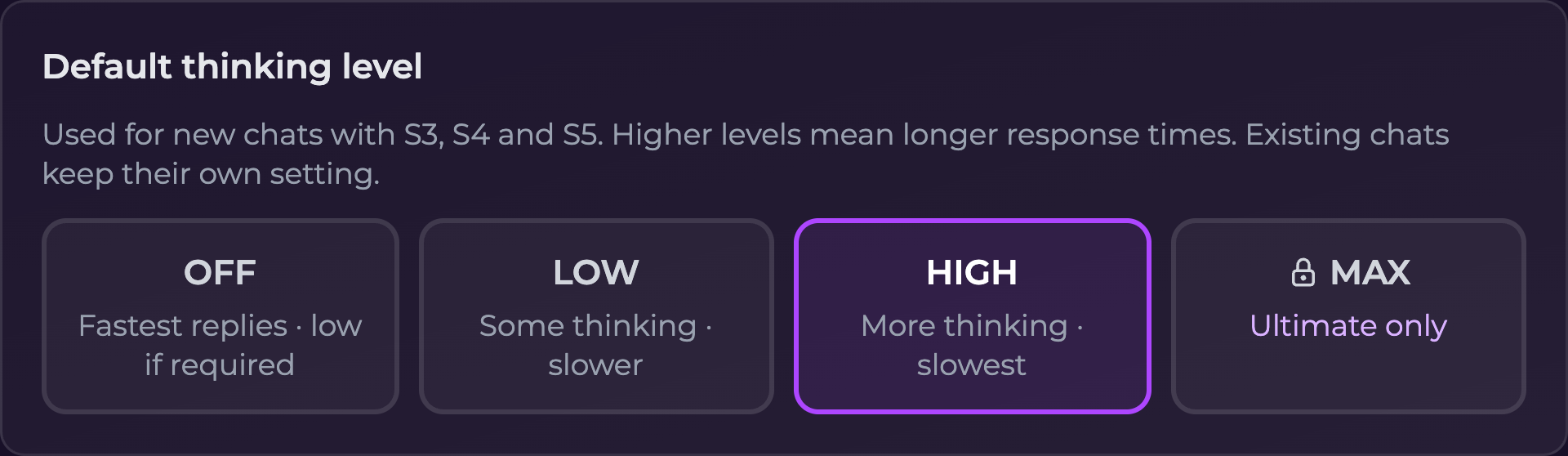
3. Find **Default thinking level** and select your preferred level.
4. Wait for the change to save automatically.

<figure><img src="https://3286776735-files.gitbook.io/~/files/v0/b/gitbook-x-prod.appspot.com/o/spaces%2F9ACKOAU4nFWSXPeE2B4s%2Fuploads%2Fgit-blob-0f0633f20850ef51d8be303bed27533f9c26e333%2Fdefault-thinking-level.png?alt=media" alt="Default thinking level in User Settings on a Premium account, with High selected and Max locked as Ultimate only" width="640"><figcaption><p>The account default applies to new S3, S4, and S5 chats. Existing conversations keep their own settings.</p></figcaption></figure>

For example, you can use **Low** as your default for new chats and keep **High** in an existing roleplay. Changing the default does not update that roleplay; use its chat settings to change it separately.

### Max availability

**Max requires Ultimate** and is available in **S3, S4, and S5**. On other plans, selecting the locked Max option opens an upgrade screen; it does not change your setting.

If Max is no longer available for your account, a saved Max preference uses **High** instead. X-3 does not offer a thinking-level control, including Max.

## Common questions

| Question                                                 | What to check                                                                                                                              |
| -------------------------------------------------------- | ------------------------------------------------------------------------------------------------------------------------------------------ |
| **Why is S4 locked when I have Premium?**                | S4 requires Ultimate. Premium includes S3, S5, and X-3.                                                                                    |
| **Why is Max locked even though I can use S5?**          | S5 access and Max thinking are separate. Premium includes S5 with Off, Low, and High; Max requires Ultimate.                               |
| **Why is Thinking level missing?**                       | Check the current chat mode. The control appears for S3, S4, and S5, and you need access to the selected mode. It is not available in X-3. |
| **Why did changing my default do nothing to this chat?** | Defaults apply to new conversations. Open this chat's settings and save its thinking level there.                                          |
| **Why are replies taking longer?**                       | Higher thinking levels add waiting time. Try Low or Off in the current chat's settings and save the change.                                |
| **Will switching modes erase my conversation?**          | No. The chat keeps its history, and subsequent replies use the selected mode.                                                              |
| **Will Max give me longer replies?**                     | It allows more thinking. Use SMS / Paragraph and clear instructions to choose the reply style you want.                                    |
| **What if a setting fails to save?**                     | Check the error, your connection, and whether your plan includes the choice. Retry, then reopen the settings to confirm it saved.          |

For related controls, see [Chat Features](/get-started/chat-features.md), [User Settings](/extra/user-settings.md), and [Subscription Tiers & Limits](/get-started/subscription-tiers-and-limits.md).