> For the complete documentation index, see [llms.txt](https://wiki.secrets.ai/llms.txt). Markdown versions of documentation pages are available by appending `.md` to page URLs; this page is available as [Markdown](https://wiki.secrets.ai/get-started/memory-system.md).
# Memory System
The Memory System is what makes your AI companions truly remember you. Learn how it works and how to make the most of it.
{% hint style="info" %}
**Lorebooks are in early testing and are not generally available.** If Lorebooks are already enabled for your account for testing, follow the [complete Lorebooks guides](/lorebooks/lorebooks.md) for illustrated instructions on sections, entries, reviews, pins, and sharing across chats. If your chat offers **Upgrade memory**, see [Upgrading Existing Memories](/lorebooks/upgrading-memory.md).
The guide below covers the **older memory list**, including HIGH / MEDIUM / LOW importance and Memory Groups. Lorebook chats use the selected book instead of those controls.
{% endhint %}
### What is Memory?
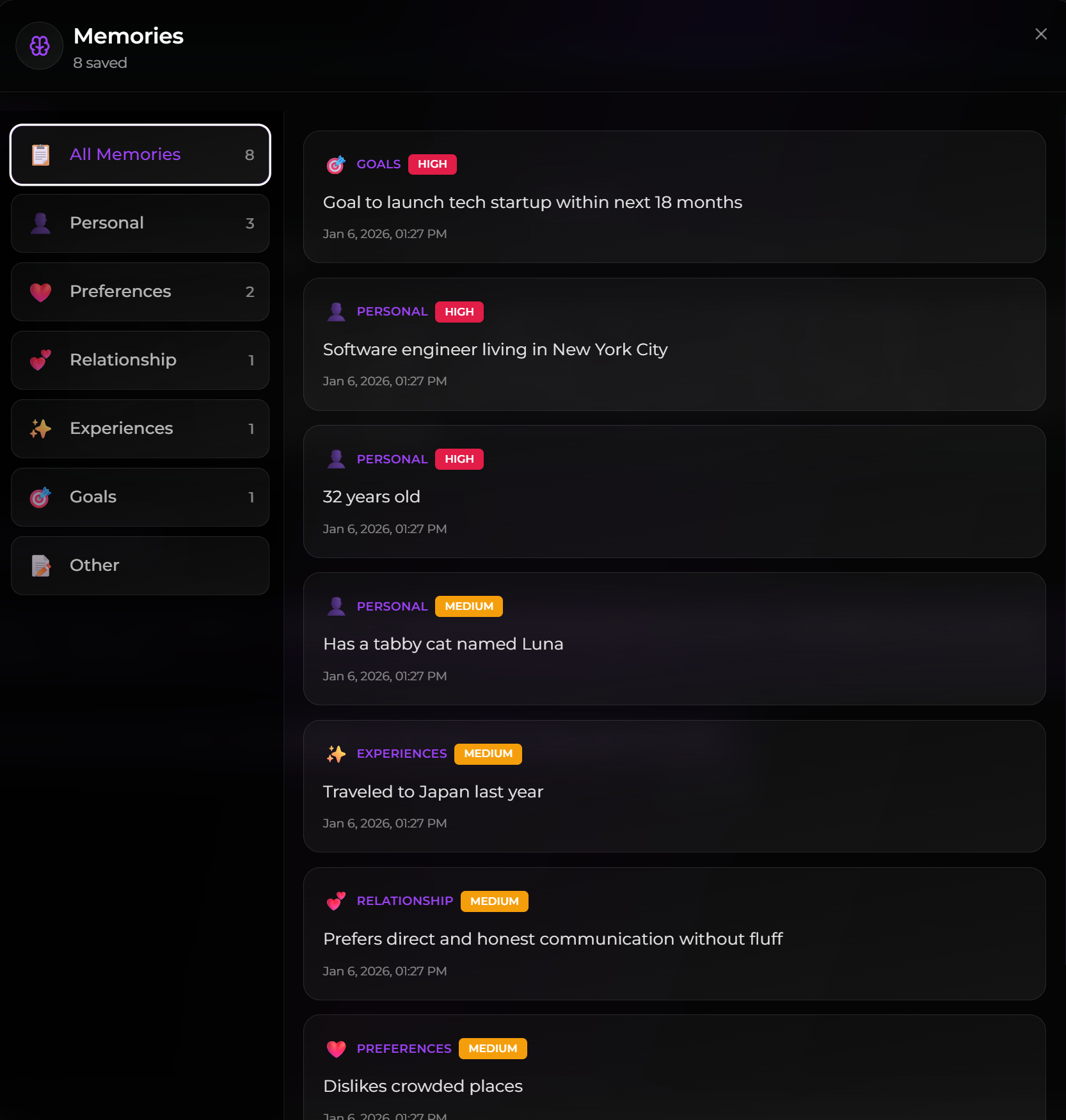
Memories are how your AI companion remembers important details about you. When you share personal information, your companion saves it and references it in future chats, making conversations feel more personal and meaningful.
{% hint style="success" %}
**Major Memory Upgrade — Now Live**
This update applies to the memory system described on this page. It is separate from **Lorebooks**, which remain in early testing and are not generally available.
We’ve massively improved the memory system. Key improvements:
* **Smart Mode:** Your companion now has an assistant that searches through memories and past conversations to pull in the right context before every reply. You’ll see a "thinking..." indicator while this happens. Toggle it on or off per chat in Chat Settings — on by default.
* **Enhanced long-term recall:** Companions can now recall topics and details from much further back in your conversation history, not just recent messages.
* **Better group chat continuity:** Companions have improved memory of what’s happened throughout group conversations.
{% endhint %}
### How Memories Work
#### Automatic Memory Saving
When you share personal information, your companion automatically saves it in the background:
1. **You Share Info**: Tell your companion something about yourself
2. **Automatic Detection**: Companion detects important information
3. **Memory Saved**: Information is saved to your memory profile
4. **Future Reference**: Companion references it in future conversations
#### What Gets Saved
*Note: Your companion will only save information that you share in-chat. It will not pull data from anywhere else.*
**Personal Information**
* Age, location, occupation
* Family details, relationship status
* Education, background
**Preferences & Interests**
* Hobbies, favorite activities
* Food preferences, likes/dislikes
* Entertainment choices
**Life Experiences**
* Past events, stories you share
* Achievements, milestones
* Significant memories
**Goals & Aspirations**
* Future plans, dreams
* Career goals, life objectives
* Things you want to accomplish
**Relationship Details**
* How you like to interact
* Communication preferences
* Boundaries and preferences
#### Memory Importance Levels
Memories have three importance levels:
**HIGH**
* Core identity facts
* Examples: Age, current job, relationship status, major life goals
* Most critical information
**MEDIUM**
* Important preferences and experiences
* Examples: Hobbies, family details, past experiences, interaction preferences
* Significant but not core identity
**LOW**
* Casual mentions and minor preferences
* Examples: Entertainment choices, passing interests, minor preferences
* Nice-to-have context
### Memory Tier Comparison Table
| Feature | Free (Baseline) | Premium | Ultimate |
| ----------------------------------- | --------------- | ---------- | ---------- |
| **Short-term Memory Length** | — | +60% | +100% |
| **Memories Accessed** | — | +300% (4x) | +500% (6x) |
| **Previous Conversations Recalled** | — | +67% | +100% |
**Short-term Memory** Your AI companion can remember more of your recent conversation as you upgrade. Premium users get 60% longer short-term memory, and Ultimate users get double (100% longer) conversation context compared to Free.
**Memories Accessed** Memories the AI can reference per conversation. Premium is 4x, and Ultimate is 6x (vs Free).
**Previous Conversations Recalled** Conversation summaries recalled for continuity. Premium is \~67%, and Ultimate is +100% (vs Free).
* **Premium**: 4x memory access, +60% context, \~67% recall
* **Ultimate**: 6x memory access, +100% context, +100% recall
### Talking to Your Companion About Memories
You can interact with your companion's memory system naturally through conversation. Here's how:
***
#### Searching Memories
Ask your companion what they remember about you:
> **You:** "Do you remember what I do for work?"
>
> **Companion:** "Yes! You mentioned you're a software engineer at a startup. You said you really enjoy the creative problem-solving aspect of it."
> **You:** "What do you know about my family?"
>
> **Companion:** "I remember you have a younger brother named Jake who's 25, and your mom lives in Seattle. You mentioned you try to visit her once a month."
***
#### Adding New Memories
Tell your companion to remember something specific:
> **You:** "Add a memory that my favorite coffee order is an oat milk latte with vanilla."
>
> **Companion:** "Got it! I've saved that your go-to coffee order is an oat milk latte with vanilla. I'll remember that! ☕"
> **You:** "Remember that I'm allergic to shellfish."
>
> **Companion:** "I've made a note of your shellfish allergy. Thanks for letting me know—that's important!"
> **You:** "I want you to remember that Fridays are my work-from-home days."
>
> **Companion:** "Saved! Fridays = WFH days for you. I'll keep that in mind when we chat."
***
#### Updating Existing Memories
Correct outdated information naturally:
> **You:** "Actually, I got promoted last week. I'm a senior engineer now."
>
> **Companion:** "Congratulations! 🎉 I've updated my memory—you're now a senior engineer. That's awesome!"
> **You:** "Update the memory about my brother—he just turned 26."
>
> **Companion:** "Updated! Jake is now 26. Time flies!"
> **You:** "I moved to Austin, so update my location."
>
> **Companion:** "Got it! I've updated your location from Portland to Austin. How are you liking Texas so far?"
***
#### Quick Reference
| What You Want | Example Phrases |
| ------------------- | ---------------------------------------------------------------------------------------- |
| **Search memories** | "Do you remember...", "What do you know about...", "Did I tell you about..." |
| **Add a memory** | "Remember that...", "Add a memory about...", "I want you to remember...", "Save this..." |
| **Update a memory** | "Actually...", "Update the memory about...", "I changed my...", "Correct the memory..." |
{% hint style="info" %}
**Tip:** You don't need special commands—just talk naturally! Your companion understands context. Saying "Actually, I'm 30 now" will update your age without needing to say "update memory."
{% endhint %}
***
### Viewing & Managing Memories
#### Viewing Your Memories
1. **Access Memory Panel**: Look for memory/view memories option in chat or settings
2. **See All Memories**: View all saved memories organized by category
3. **Check Importance**: See which memories are marked HIGH, MEDIUM, or LOW
#### Managing Memories
You can:
* **View** saved memories
* **Delete** memories you no longer want
* **Change importance** (HIGH / MEDIUM / LOW) by **clicking on the importance level**
#### Keep an eye on the Memory tab
Do a quick check once in a while. It keeps your companion accurate.
* **Verify importance**: Promote core facts to **HIGH**. Demote minor details to **LOW**.
* **Remove duplicates**: Delete memories that say the same thing. Keep the best version.
* **Remove incorrect/outdated items**: Delete wrong memories.
**Deleting Memories**:
* Click delete on any memory you want to remove
* Confirm deletion
* Memory is permanently removed
* Companion will no longer reference deleted memories
### Memory and Time Travel
When you use [Time Travel](/get-started/time-travel.md), memories created from deleted messages are removed.
### Troubleshooting Memory Issues
#### Companion Not Remembering
**Possible Causes**:
* Information not important enough to save
**Solutions**:
* Share information again
* Be more specific about importance
* Check your saved memories
#### Wrong Information Remembered
**Solutions**:
* Tell your companion to update it: "Actually, I'm 28, not 27"
* Ask them to correct it: "Update the memory about my age"
* Delete incorrect memories from the memory panel
* Be clear when correcting information
### Frequently Asked Questions
**Q: How does my companion remember things?**
* Companions automatically save important information you share as memories.
**Q: Can I manually add memories?**
* Yes! Just tell your companion to remember something. Say "Remember that..." or "Add a memory about..." and they'll save it for you.
**Q: Do memories work across different companions?**
* Memories are per-companion (each companion remembers you independently).
**Q: Do group chats share memories with my 1-on-1 chats?**
* Yes. There is an option to bring over memories, or start fresh.
* Details: [Group Chats](/get-started/group-chats.md).
**Q: Can I edit memories?**
* Yes! Tell your companion to update a memory naturally—just say "Actually, my job changed to..." or "Update the memory about my age." You can also change the importance level by clicking on it in the memory panel, or delete incorrect memories.
**Q: How do I see what my companion remembers?**
* Access the memory panel in chat or settings to view all saved memories.
**Q: Do memories persist if I delete my account?**
* No, all memories are deleted when you delete your account.
**Q: Can I export my memories?**
* Currently not available. Contact support if you need memory exports.
***
Want to learn more? Check out [Chat Features](/get-started/chat-features.md) or see how [Image Generation](/create/image-generation.md) works!