> For the complete documentation index, see [llms.txt](https://wiki.secrets.ai/llms.txt). Markdown versions of documentation pages are available by appending `.md` to page URLs; this page is available as [Markdown](https://wiki.secrets.ai/lorebooks/universe-books.md).

# Universe Books

PREMIUM and ULTIMATE feature. Create reusable Universe Books, start private or group chats from copies, and keep each storyline independent.

{% hint style="info" %}
**Available on PREMIUM and ULTIMATE.** Lorebooks are included for all subscribers on these [plans](/get-started/subscription-tiers-and-limits.md). On FREE, your companions use the [Memory System](/get-started/memory-system.md).
{% endhint %}

A **Universe Book** is a reusable starting book with no companion attached. Write the setting, people, rules, and starting situation once, then use it to begin conversations with different companions.

**Each chat you start from a Universe gets its own companion book.** Later edits to the Universe do not update existing copies. Changes made during a chat stay in that chat's book and do not rewrite the Universe or another copy.

For example, an **Asterfall** Universe can start a lighthouse story with Mira and an archive mystery with Ellis. Both begin with the same town and its rules, then develop independently.

## Choose between a companion book and a Universe

| What you want                                                                    | Use                                                                                            |
| -------------------------------------------------------------------------------- | ---------------------------------------------------------------------------------------------- |
| Several chats with Mira should share the same ongoing story                      | The **same companion book** in those chats. Edits affect all of them.                          |
| Mira and Ellis should start with the same setting, then develop separate stories | A **Universe Book**. Start each chat from it to create separate companion books.               |
| Try the same opening with Mira again without carrying over the first attempt     | Start another chat from the Universe. It gets a fresh copy of the Universe's current contents. |
| A completely empty starting point                                                | A new companion book or **Start a separate book**.                                             |

Universes are part of your own account. Using one does not publish it or share it with other users. To give someone a separate copy, [export it as a Universe file](/lorebooks/import-and-export.md). See [Managing books across chats](/lorebooks/managing-books.md) for sharing an existing companion book between your chats.

## Create a Universe

1. Open **Lorebooks** and select **New book**.
2. Select **Universe** as the book type. You do not need to choose a companion.
3. Enter a recognizable name, up to **60 characters**, such as `Asterfall`.
4. Select **Create book**. The new Universe opens empty, ready for your writing.

If the **Universes** tab is empty, its **New Universe** button opens the same form with Universe selected.

<figure><img src="https://3286776735-files.gitbook.io/~/files/v0/b/gitbook-x-prod.appspot.com/o/spaces%2F9ACKOAU4nFWSXPeE2B4s%2Fuploads%2Fgit-blob-371e4c0b3baf935cf595824976180bb006c51d45%2Funiverse-create.png?alt=media" alt="New book dialog with Universe selected and the fictional name Asterfall entered" width="512"><figcaption><p>A Universe needs a name, but no companion. Add its starting material after creating it.</p></figcaption></figure>

## Write reusable starting material

A Universe has **Premise**, **Open threads**, **Cast**, **World**, **Relationship**, and **Facts**. Use the usual entry editor, descriptions, [keywords](/lorebooks/keywords.md), [pins, and locks](/lorebooks/pins-and-locks.md).

| Area             | What belongs here                                              | Asterfall example                                                                   |
| ---------------- | -------------------------------------------------------------- | ----------------------------------------------------------------------------------- |
| **Premise**      | The situation every new story should begin with                | A coastal town is preparing for its Lantern Festival, but a route chart is missing. |
| **Open threads** | Unresolved tasks at the beginning of each story                | Find the north-coast chart before the festival.                                     |
| **Cast**         | People who belong to the setting                               | Ellis Reed runs the harbor archive.                                                 |
| **World**        | Places, customs, and rules                                     | Visitors ring the silver bell before entering the lighthouse map room.              |
| **Relationship** | Relationships that should already be established in every copy | The lighthouse keeper and archivist cooperate on festival preparations.             |
| **Facts**        | Specific details that should start out true                    | The festival route begins at the harbor steps.                                      |

<figure><img src="https://3286776735-files.gitbook.io/~/files/v0/b/gitbook-x-prod.appspot.com/o/spaces%2F9ACKOAU4nFWSXPeE2B4s%2Fuploads%2Fgit-blob-1db5084a82a8c6a0856471d9d650cfb3e46ef766%2Funiverse-overview.png?alt=media" alt="Asterfall Universe Overview showing Premise, Open threads, four entry sections, Change cover, and What a new chat sees"><figcaption><p>A Universe holds the starting material. Chronicle and companion review queues belong to the companion books created from it.</p></figcaption></figure>

Keep statements suitable for every companion or storyline you intend to use. If Rowan has only met Mira in one particular conversation, add that meeting to Mira's copy rather than making it part of everyone's starting point.

You could use this Premise:

> Asterfall is a fictional coastal town preparing for the Lantern Festival. A missing north-coast chart threatens the festival route. Rowan is a visiting mapmaker helping with preparations.

Save Premise and Open threads with their own **Save changes** buttons. Save each entry separately. The [first-book walkthrough](/lorebooks/quickstart.md) explains the entry fields.

### Why there is no Chronicle or review queue

No chat writes directly into a Universe. It has no Chronicle and no companion-created changes waiting for review. Put established background in its four entry sections; the companion book develops its own Chronicle and review queue as you chat.

Select **What a new chat sees** to preview its standing information. This is a check of the starting context, not a list of every entry that will be copied. Keep essential pins concise and check the **Pinned** space before adding more.

## Start a private chat from a Universe

You can start from the book itself:

1. Open **Lorebooks → Universes**.
2. Find the Universe and select **New chat** on its card.
3. Choose the companion in **Start a chat from \[Universe name]**.
4. Select **Start chat**.
5. In the new conversation, open **Open Lorebook** to inspect its companion-specific copy.

You can also choose the source while creating a chat:

1. Select your companion in the new-chat form.
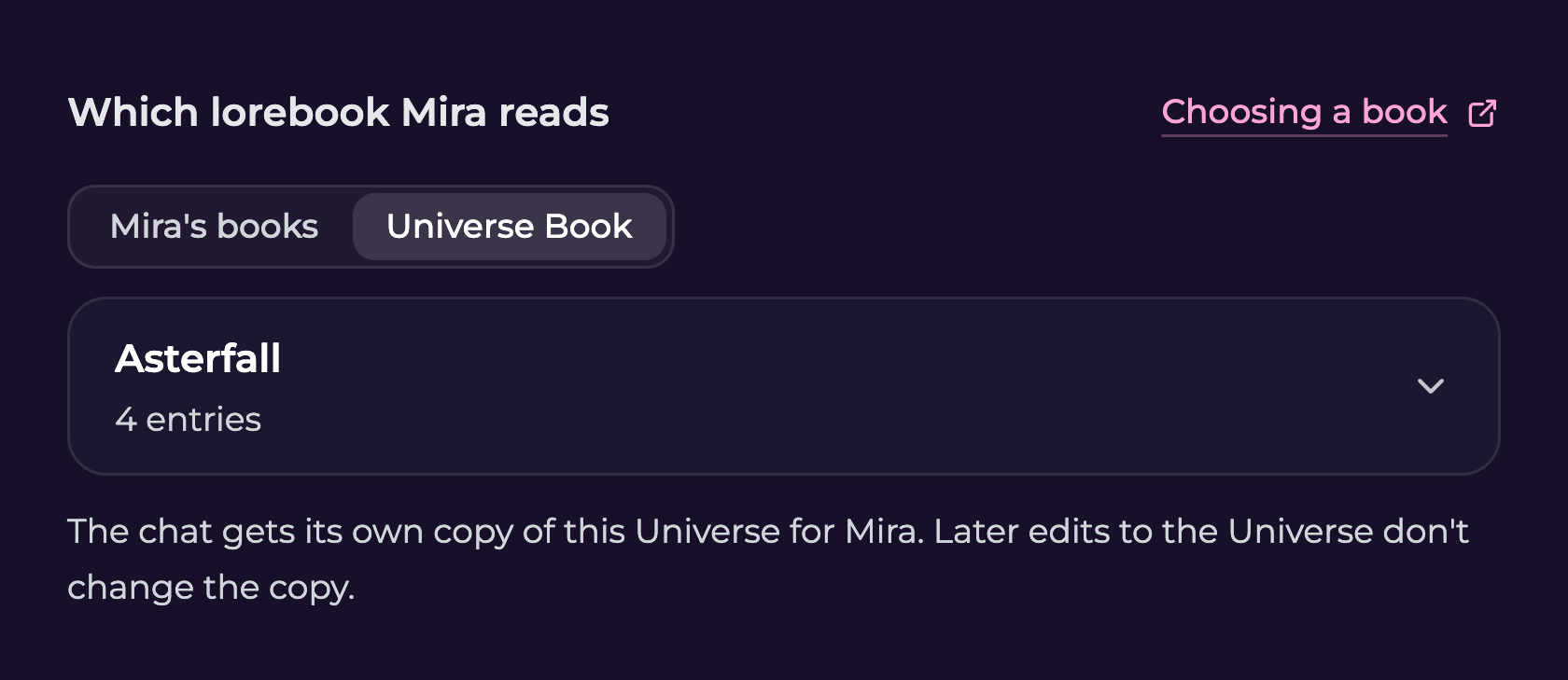
2. Under **Which lorebook \[companion] reads**, choose **Universe Book** instead of **\[companion]'s books**.
3. Select the Universe from the dropdown.
4. Finish creating the chat.

<figure><img src="https://3286776735-files.gitbook.io/~/files/v0/b/gitbook-x-prod.appspot.com/o/spaces%2F9ACKOAU4nFWSXPeE2B4s%2Fuploads%2Fgit-blob-e06f82d8753c9af5186b87a121d76cef87735ed2%2Funiverse-chat-picker.png?alt=media" alt="New-chat memory choice for Mira with Universe Book selected, Asterfall chosen, and an explanation that later Universe edits do not change the copy" width="560"><figcaption><p>The Universe Book choice creates a new copy for this chat's companion.</p></figcaption></figure>

The copy's name combines the Universe and companion, such as **Asterfall — Mira**. Starting from Asterfall again creates another copy, even with the same companion. Rename the copies to distinguish your stories if their names are similar.

To continue an existing story, choose its companion book under **\[companion]'s books** instead of starting from the Universe again.

## Use Universes in a group chat

When creating a group, choose a source separately for each member under the **Lorebooks** section. You can select a Universe for one member and an existing companion book for another.

If both Mira and Ellis start from Asterfall, **each receives a separate copy**. They begin with matching background, but an edit to Mira's copy does not automatically update Ellis's. They still participate in the group's visible conversation.

Lorebooks are included with **PREMIUM and ULTIMATE**, but **Group Chats require ULTIMATE**. See [Group Chats](/get-started/group-chats.md) for the creation steps.

## Use a Universe when upgrading an older chat

If a chat still uses the older memory system:

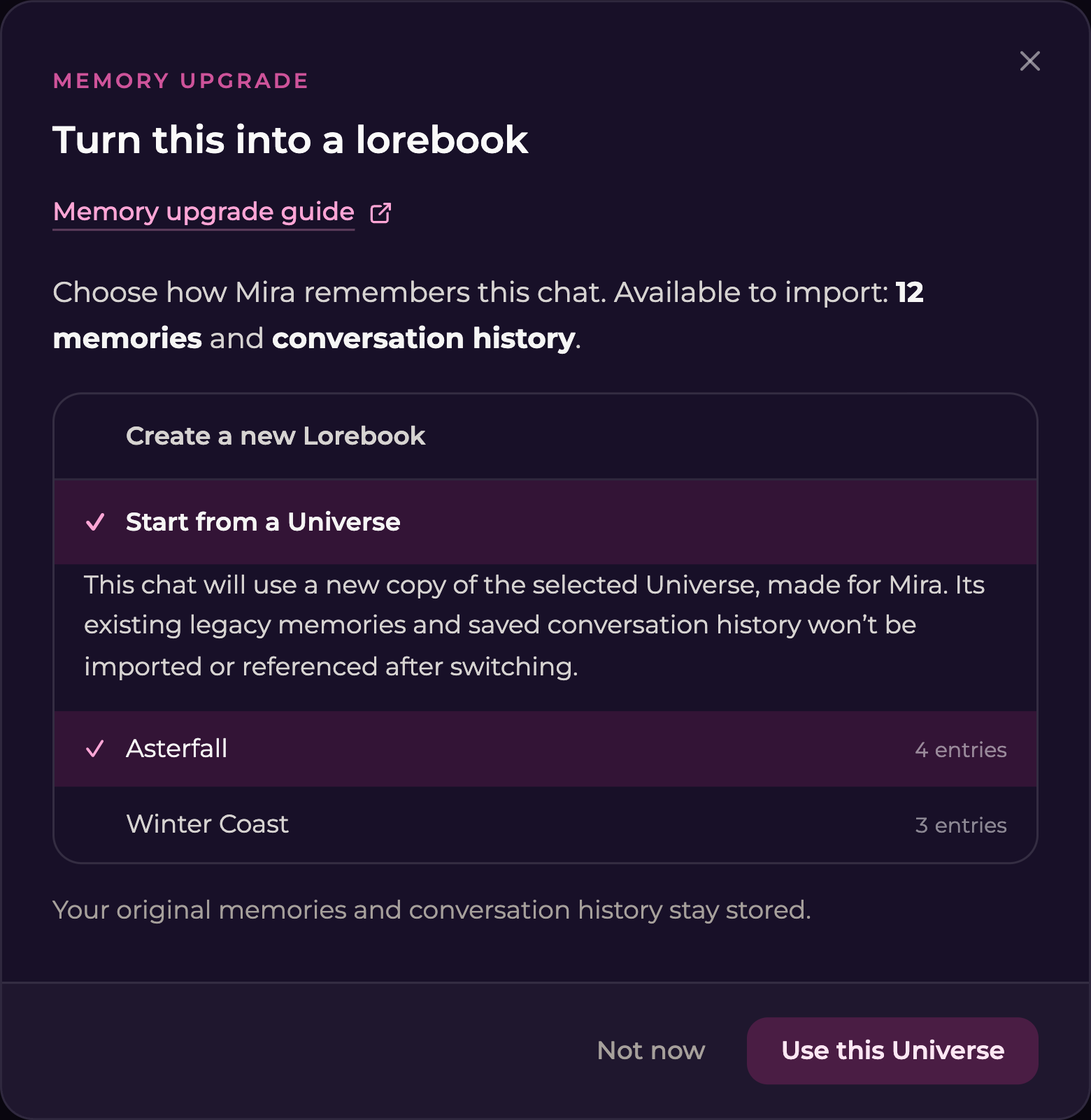
1. Open **Upgrade memory**.
2. Expand **Start from a Universe**.
3. Select the Universe and read the explanation.
4. Select **Use this Universe**.

<figure><img src="https://3286776735-files.gitbook.io/~/files/v0/b/gitbook-x-prod.appspot.com/o/spaces%2F9ACKOAU4nFWSXPeE2B4s%2Fuploads%2Fgit-blob-fecb5ce68c8599a94d407d325fc02b8d0a476c36%2Funiverse-upgrade.png?alt=media" alt="Upgrade memory dialog with Start from a Universe expanded, Asterfall selected, and the Use this Universe action" width="520"><figcaption><p>This option starts the chat on a copy of the Universe. It does not import the chat's old memories or saved conversation history.</p></figcaption></figure>

The chat uses a new copy made for its companion. Its existing legacy memories and saved conversation history are **not imported into that book or used as its historical memory after switching**. Visible chat messages remain.

If you want to preserve the old continuity through an import, use **Create a new Lorebook** or the appropriate same-memory-group option instead. See [Upgrading existing memories](/lorebooks/upgrading-memory.md#choose-the-right-upgrade-option) before choosing a destination.

## What carries into a copy?

| Item                     | What happens                                                                                                                                 |
| ------------------------ | -------------------------------------------------------------------------------------------------------------------------------------------- |
| Premise and Open threads | Copied as they are when the new book is created.                                                                                             |
| Current entries          | Titles, descriptions, Content, and keywords are copied. A saved custom keyword list remains custom.                                          |
| Locks                    | Copied, so the companion cannot change entries you have locked. You can still edit them yourself.                                            |
| Pins                     | Kept within the pin space available to the new book. If they no longer all fit, some entries are copied without pins. Their content is kept. |
| History and reviews      | The companion book begins its own change history. The Universe's previous revisions are not carried over.                                    |
| Cover                    | The Universe's chosen cover is not copied. Set the companion book's cover separately.                                                        |

Editing the Universe changes what **future copies** start with. Correct an existing story by opening the companion book **from that chat** and editing it there. There is no automatic sync or merge between the original Universe and its copies.

Once created, a copy works like any other companion book. You can choose it for other chats with that same companion if those chats should share continuity.

## Import and export Universe files

Use **Export as JSON** in a Universe's **Book actions** menu to download its saved contents. Use **Import Universe** on the Universes tab to load a Secrets Universe `.json` file.

Every import creates a separate Universe. It does not replace the original, update existing chat copies, or include their conversations. See [Importing and exporting Universes](/lorebooks/import-and-export.md) for the illustrated steps, what transfers, and file limits.

## Covers and archiving

Use **Change cover** on Overview to choose one of your generated images. A Universe can use your images from any companion. See [Changing a book's cover](/lorebooks/overview.md#change-a-books-cover) for filtering, saving, and resetting it.

To put a Universe away, open its **Book actions** menu and select **Archive**, then confirm. It becomes read-only and is no longer available as the starting point for new chats. **Existing copies keep working and are unchanged.**

To use it again, open the **Universes** tab, change the status filter to **Archived**, and select **Unarchive** on its card.

## Common questions

**Why is my Universe missing from the new-chat picker?**

Check the Universes tab and its Archived filter. Unarchive the book if needed. If you have not made a Universe yet, select **Create a Universe Book** from the new-chat form and create one in Lorebooks first.

**Why did my correction not appear in a chat?**

The chat reads its own companion book. A Universe edit only affects copies created afterward. Open the book from the affected chat and make the correction there.

**Why are there two books with similar names?**

Each start from a Universe makes a separate copy. Check the companion and connected chats, then rename each copy to identify its storyline.

**Why is my Universe not recording what happens?**

The companion writes to the book attached to the chat. Open that book to inspect its Chronicle and review queue.

**Can I make every companion read and update the same Universe?**

A Universe provides a common starting point through copies. Each companion has its own book; there is no shared live Universe that every companion edits.